
Bring Your Projects to Life with Nova Software
The dedicated desktop application for writing, compiling, and flashing C++ sketches to NovaCircuit hardware kits and ESP32 microcontrollers.
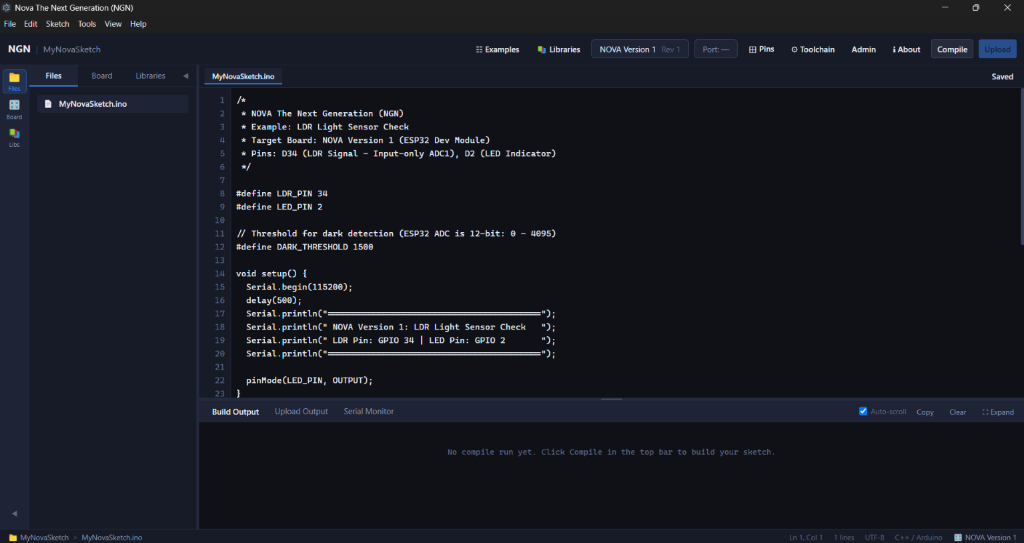
Nova The Next Generation (NGN) desktop IDE
Nova NGN IDE 1.0.4
The major release of the Nova The Next Generation (NGN) IDE is faster, streamlined, and engineered specifically for students learning electronics and plug-and-play hardware! In addition to a modern code editor and responsive dark interface, it features built-in ESP32 C++ toolchains, visual pin connection guides, and an integrated Serial Monitor.
Includes CH340 and CP2102 USB drivers for instant hardware detection on Windows laptops. Need upcoming beta features? Check our latest nightly branch.
Why Students Love NGN IDE
Engineered to eliminate complicated software setup so learners can focus directly on electronics logic and C++ code.
Integrated ESP32 Compiler
Built-in GCC/Xtensa embedded toolchain tailored for NOVA Version 1 board. No complicated manual toolchain setup.
Live 115200 Serial Monitor
Real-time telemetry logging with auto-scroll, clear buffer, and instant sensor reading validation.
Pre-Loaded Project Examples
Includes all 10 curriculum textbook sketches: LDR Light Sensor, DHT11 Climate, Wi-Fi IoT Cloud, and Ultrasonic sonar.
Visual Pinout Diagnostics
Interactive onboard pin inspector mapping D34 (ADC1), D2 (LED indicator), D4, and 5V regulated rails.
From Download to First Running Circuit
Getting started with your NovaCircuit kit and NGN software takes less than 3 minutes.
Download NGN-Setup.exe
Click Download to get the official installer (NGN-Setup.exe, 98 MB) or Portable ZIP. The installer bundles all libraries, Arduino CLI, and embedded ESP32 compiler.
Connect Hardware via USB
Plug your NovaCircuit board (NOVA Version 1 ESP32) into your computer with a standard USB cable (5V DC low-voltage).
Select Board & COM Port
In the top toolbar, ensure "NOVA Version 1" is selected and choose your USB serial COM port from the dropdown.
Click Compile & Upload
Open any example sketch (like LDR Light Sensor Check) and click "Upload". Watch your code run live in seconds!
Inspect, Modify, and Upload in Real-Time
NGN IDE comes pre-configured with tested C++ firmware for the NovaCircuit starter kits. You can easily adjust sensor thresholds, toggle pins, and monitor serial output directly.
// NOVA The Next Generation (NGN)
// Example: LDR Light Sensor Check
#define LDR_PIN 34
#define LED_PIN 2
#define DARK_THRESHOLD 1500
void setup() {
Serial.begin(115200);
pinMode(LED_PIN, OUTPUT);
}
void loop() {
int sensorVal = analogRead(LDR_PIN);
Serial.print("LDR Value: "); Serial.println(sensorVal);
digitalWrite(LED_PIN, sensorVal > DARK_THRESHOLD ? HIGH : LOW);
delay(500);
}
System Requirements & Release Notes (v1.0.4)
Minimum Requirements
- • OS: Windows 10 (64-bit) or Windows 11
- • Processor: 1.6 GHz dual-core or faster
- • RAM: 4 GB minimum (8 GB recommended)
- • Storage: 250 MB free disk space
- • Ports: 1x standard USB port for board flashing
What's New in v1.0.4
- • Added native driver support for NOVA Version 1 board
- • Enhanced 115200 baud Serial Monitor stability
- • Bundled pre-loaded school LDR and DHT11 sketches
- • Instant one-click compiler diagnostic error reporting